AI Adoption Platform by Frontierz

Bring your team
to the AI frontier.

We find where AI helps your business, where it doesn’t, and stay until it sticks.

See how it works

Built for teams of all sizes.

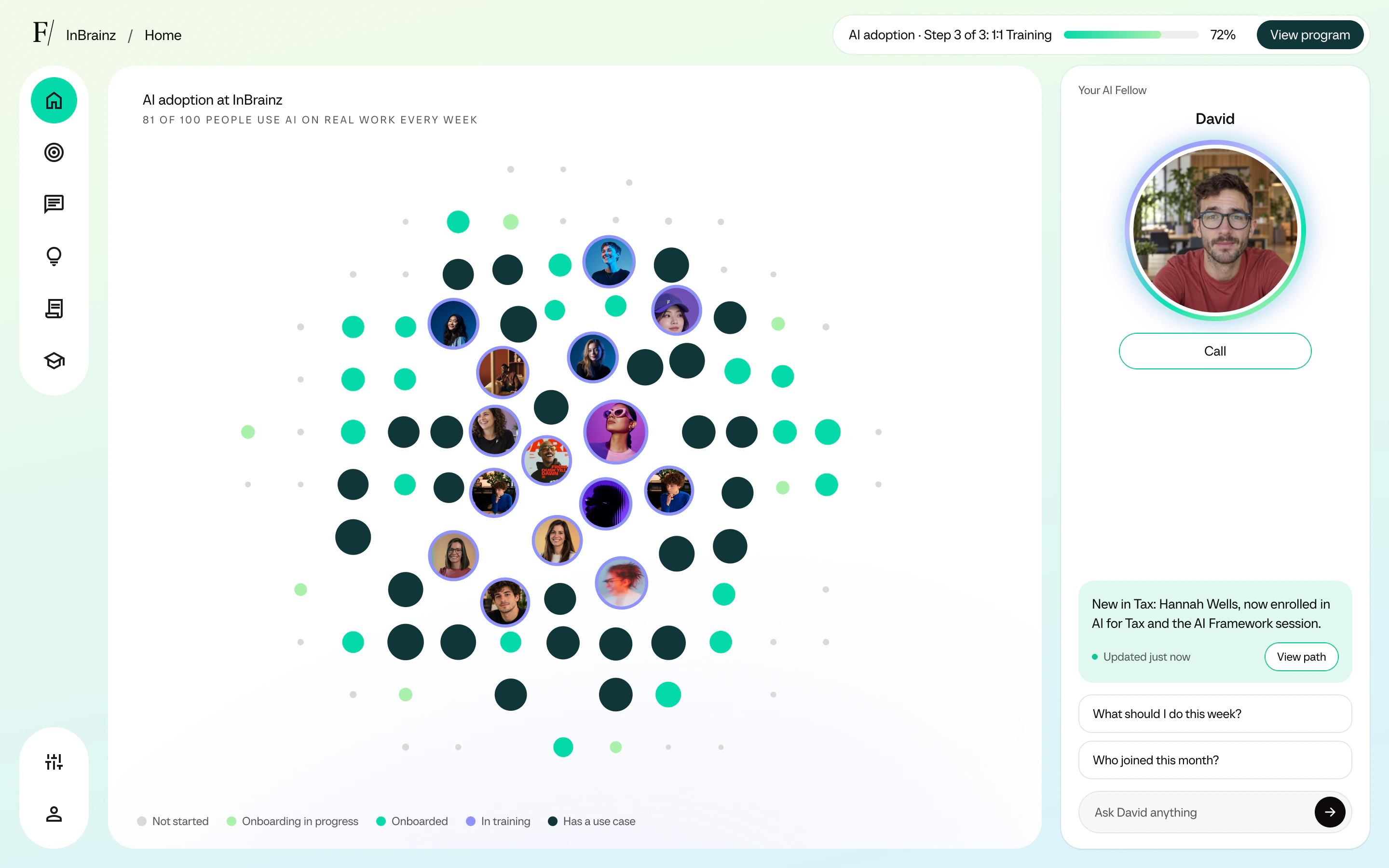
The AI Control Tower home: how many people say they use AI on real work every week, a map of each person’s stage in the program, and the AI Fellow suggesting a reminder for the team furthest behind.

Global Partner of the Year 2026

From “we should use AI”
to “here’s how we do it”, in three steps.

Step 1

Discovery: define goals and see how your teams use AI today.

We begin as a change-management project would: you tell us what you want from AI, and a short interview with each person shows which AI use cases your teams already have, if any, and where they get stuck.
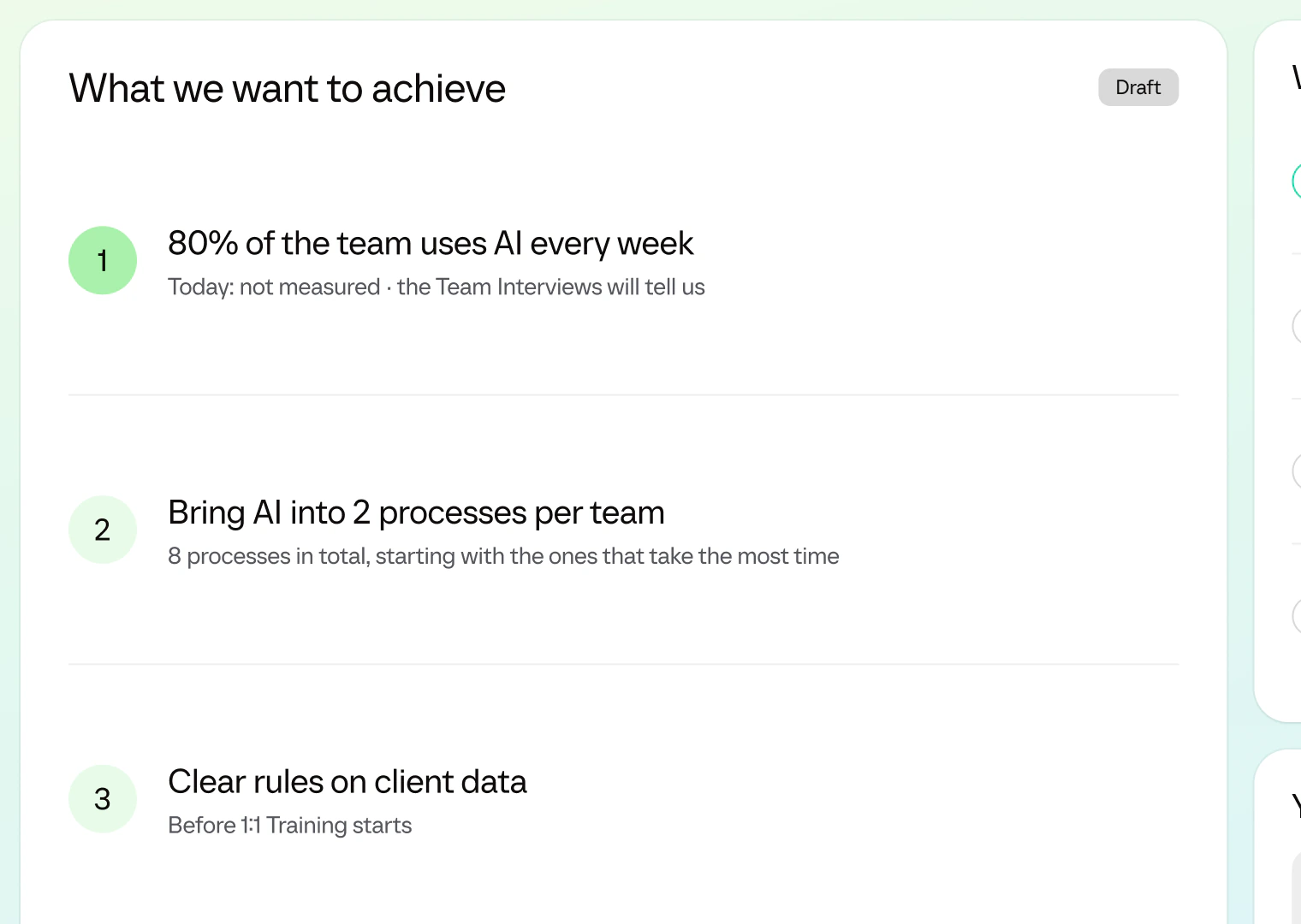
The Initial Assessment report in Frontierz: the company’s goals for AI, each with how it will be measured.
Step 2

AI Framework: build your company’s rules for using AI.

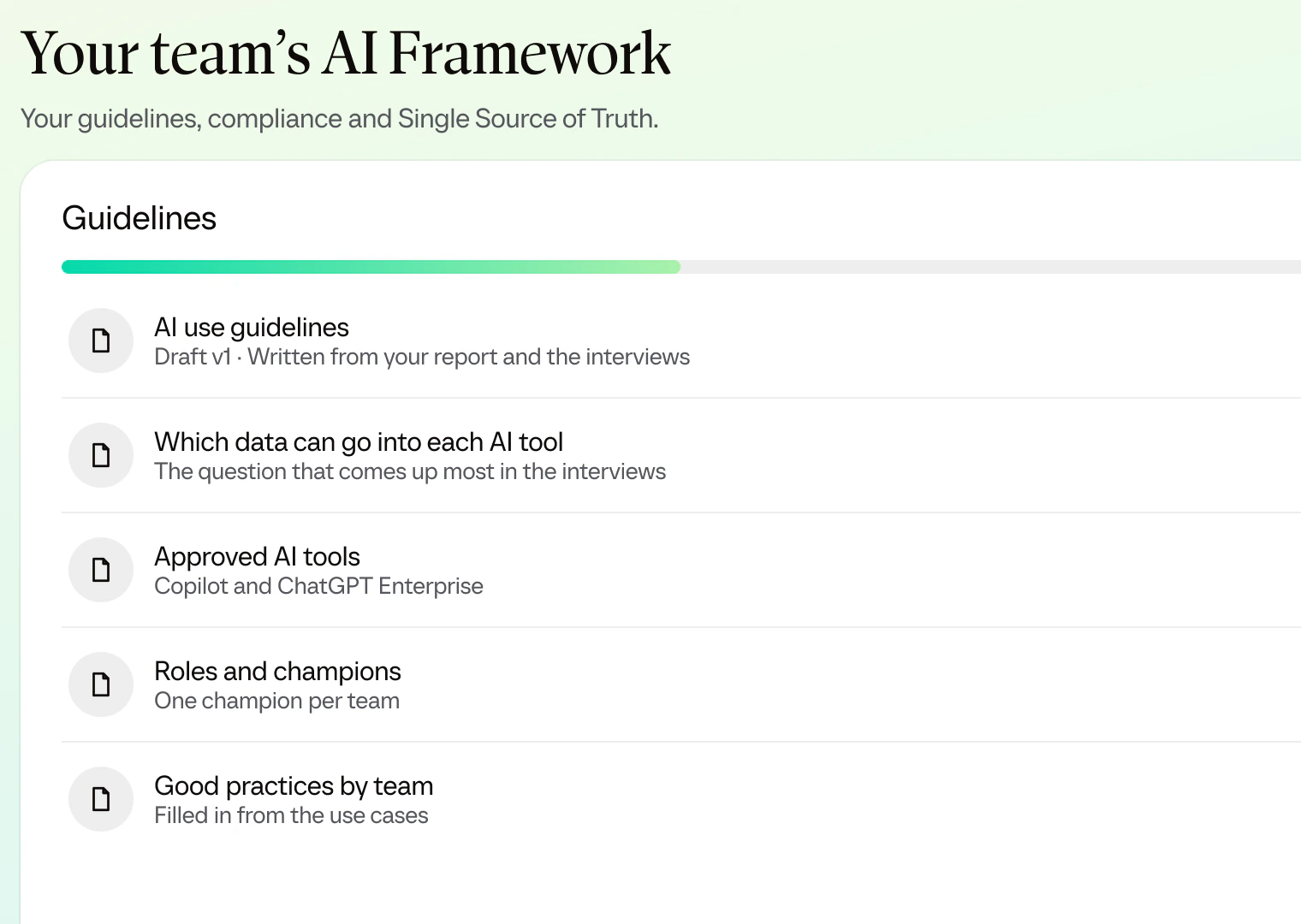
Get your AI Framework ready: which AI tools your teams use, for what work and with what data, mapped to the EU AI Act and GDPR. Once you approve it, it becomes part of your AI training in Step 3.

The AI Framework in Frontierz: the company’s guidelines, each with its approval status, from AI use guidelines to approved AI tools.
Step 3

1:1 Training: personalized to each person’s role and tasks.

Each person trains with an AI Fellow in 4 to 6 live voice sessions, built around their own role and the use cases you chose for their team after the interviews.

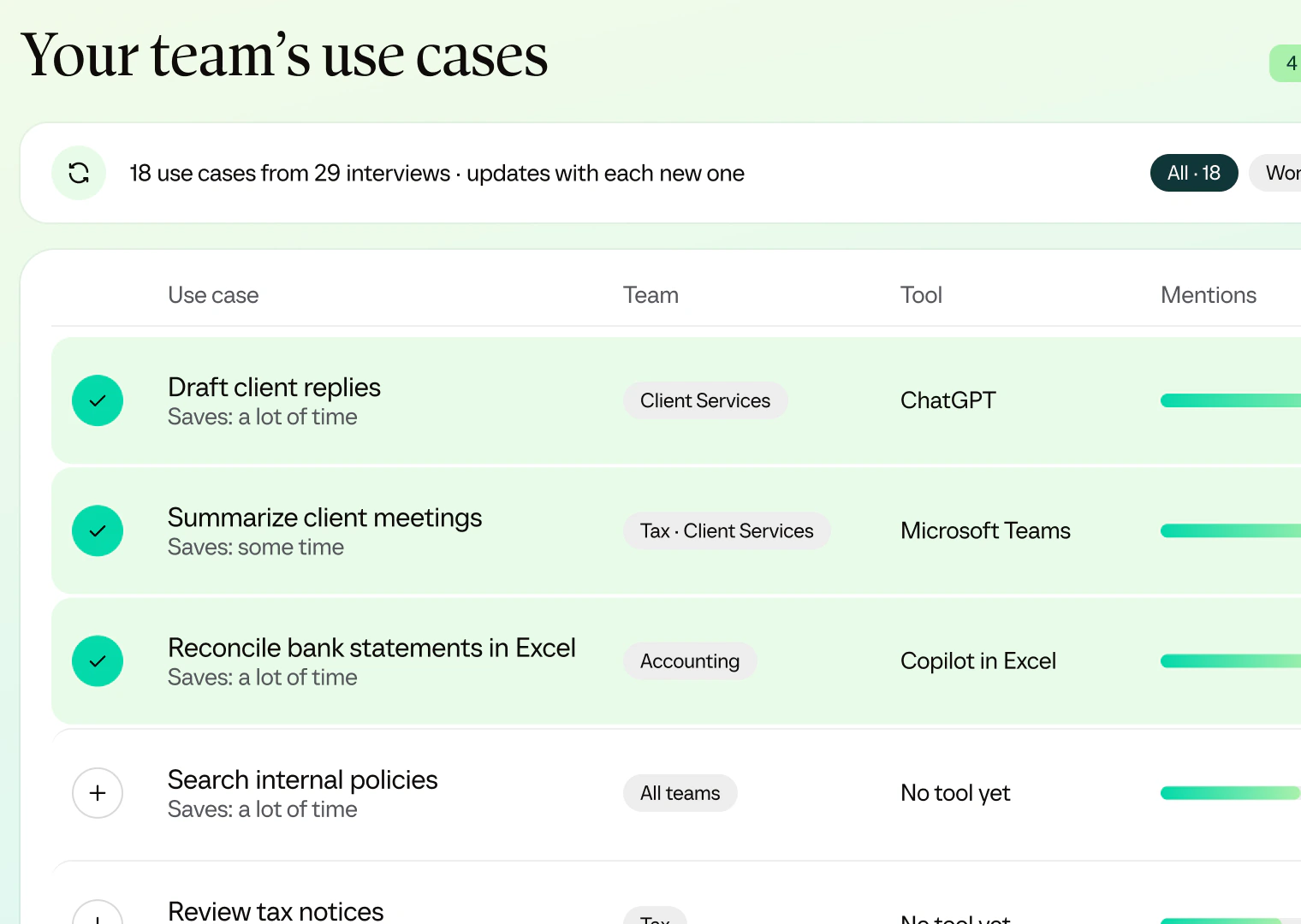
The use cases gathered from the Team Interviews in Frontierz, by team and AI tool, with the ones chosen for 1:1 Training checked.

After the three steps

Discover your new AI Control Tower:

After the three steps, you get access to your AI Control Tower, where you follow how each team is using AI on the live Use Case Map and where anyone who joins later is trained on what their team already knows.

  1. Home

    See how your teams use AI at work.

    Track everyone by adoption stage and see who says they apply AI to real work each week.

    1. How many people say they use AI on real work every week, from their sessions with the AI Fellow.
    2. Each person’s stage, from not started to a use case of their own.
    The AI Control Tower home: how many people say they use AI on real work every week, a map of each person’s stage, and the AI Fellow saying that Hannah Wells, new in Tax, is already enrolled in the team’s Learning Path and the AI Framework session.
  2. New joiners

    Bring new people up to speed.

    When someone joins a team, your AI Fellow enrolls them in the team’s Learning Path and the AI Framework session, so they start where their team already is.

    1. Who joined, and what your AI Fellow enrolled them in.
    2. Ask who joined, team by team.
    The AI Control Tower home: how many people say they use AI on real work every week, a map of each person’s stage, and the AI Fellow saying that Hannah Wells, new in Tax, is already enrolled in the team’s Learning Path and the AI Framework session.
  3. 1:1 Training

    Follow every team’s training.

    A Learning Path for every team, in short sessions with an AI Fellow. When a team falls behind, the Fellow offers them a time.

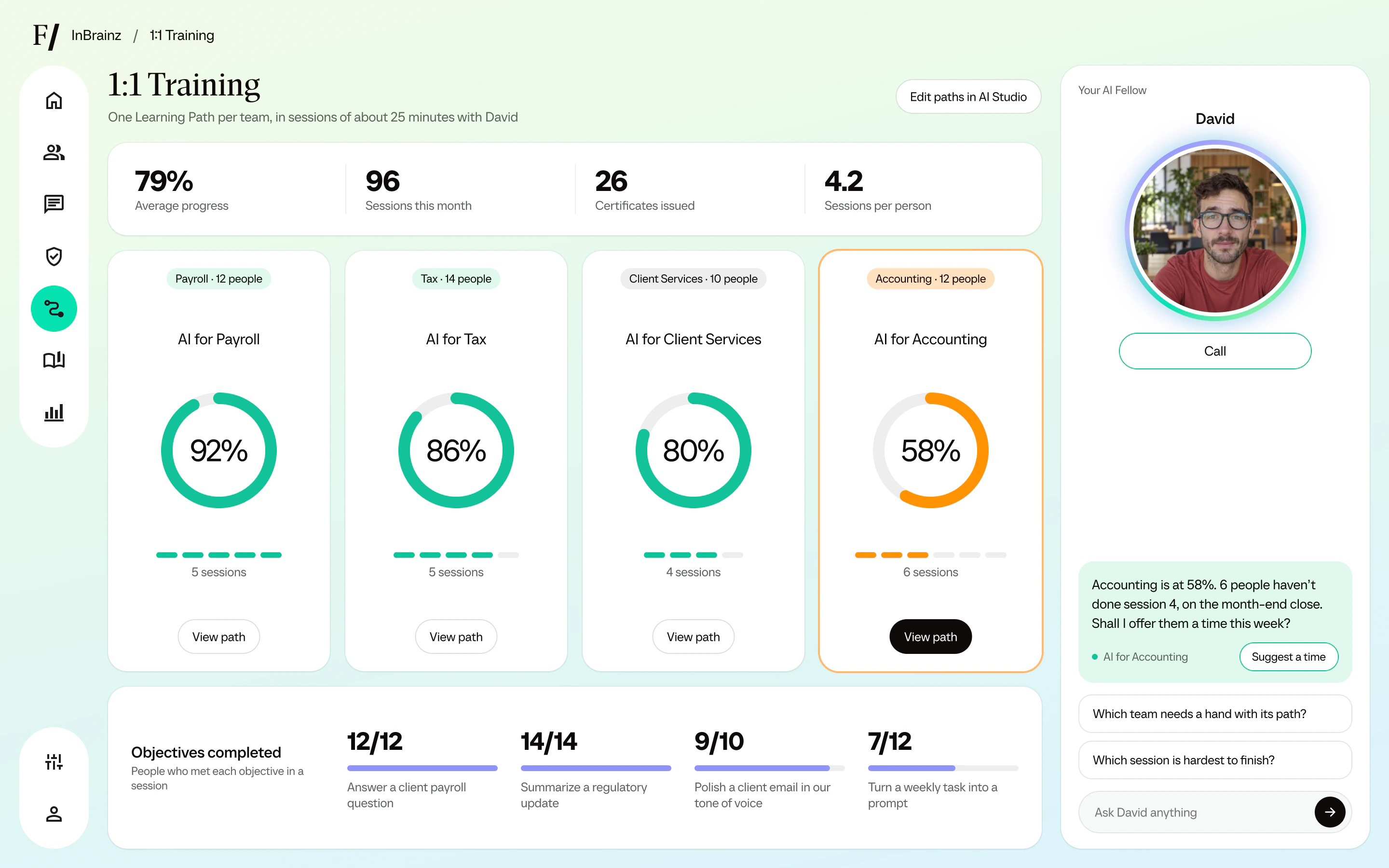
    1. Each team’s progress through its Learning Path.
    2. The team falling behind.
    3. The time your AI Fellow offers that team.
    1:1 Training: progress of the Learning Paths for Payroll, Tax, Client Services and Accounting, and the objectives people met in their sessions.
  4. Use Case Map

    See what saves time, team by team.

    As people train, they share the prompts and skills that save them time. Each use case moves from idea to pilot to everyday use, and each team validates the hours it saves.

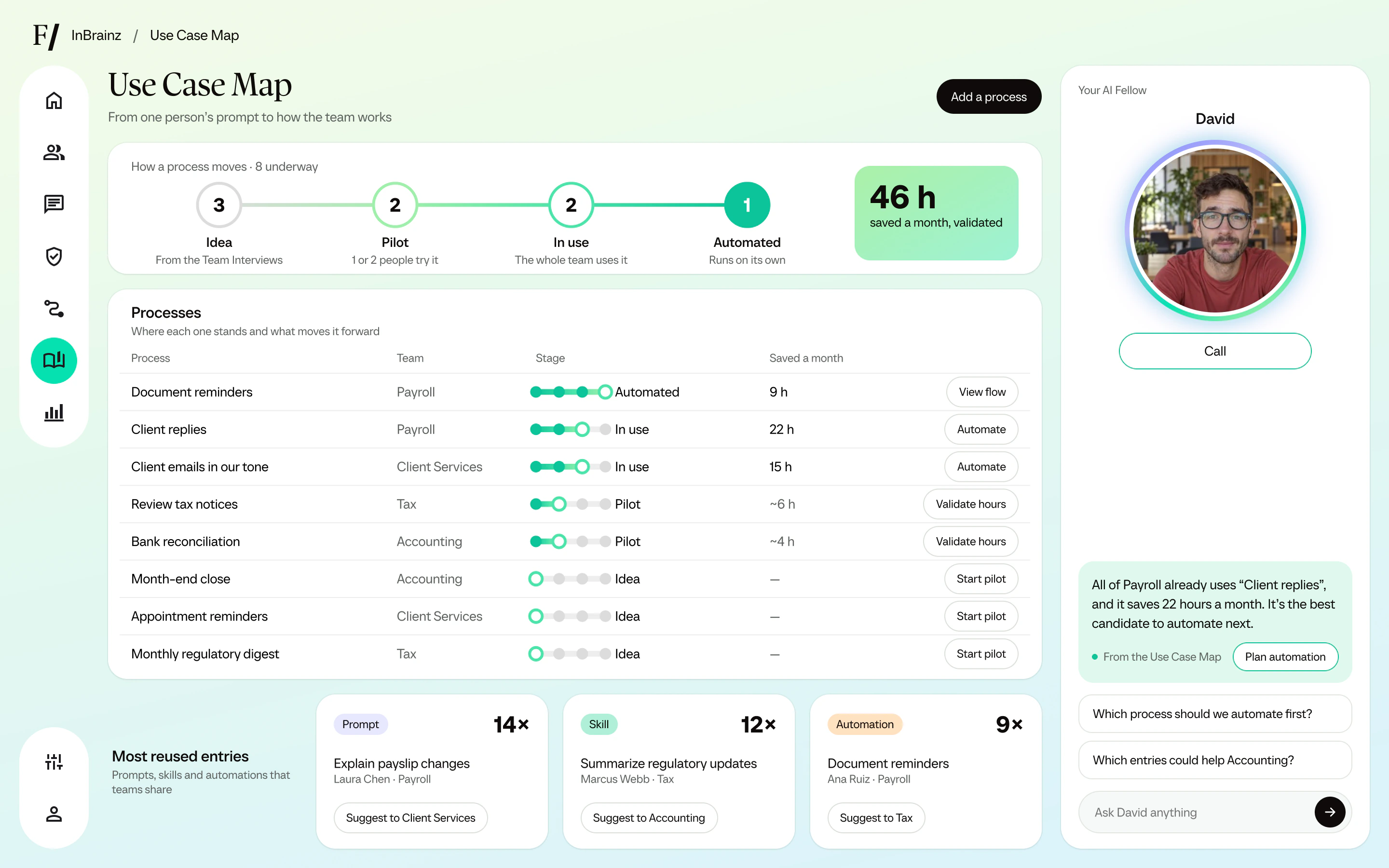
    1. Where each use case stands, from idea to in use.
    2. The hours saved, once each team validates them.
    3. The next move for each use case.
    The Use Case Map: how many processes are at each stage, each process with its team and the hours it saves, and the most reused entries.
  5. AI Framework

    Keep your rules current.

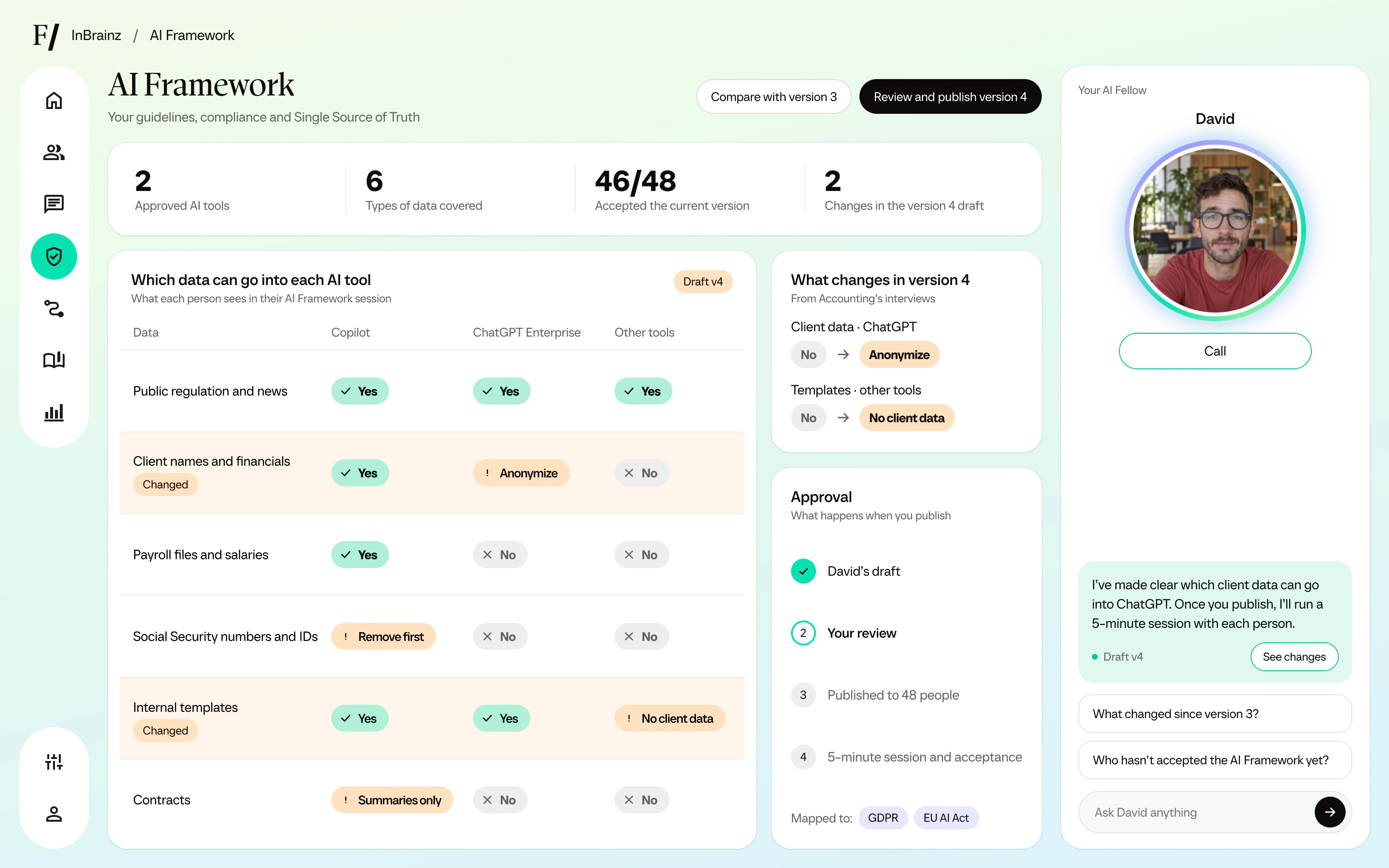
    When a tool or a rule changes, your AI Fellow drafts the next version from what your teams say. You review and publish it, and everyone takes a short session.

    1. Which data can go into each AI tool.
    2. What changes in the new version, and where it came from.
    3. A short session for everyone once you publish.
    The AI Framework draft: which data can go into Copilot, ChatGPT Enterprise and other tools, what changes in version 4, and the approval steps.
  6. Monthly Report

    Send leadership a report every month.

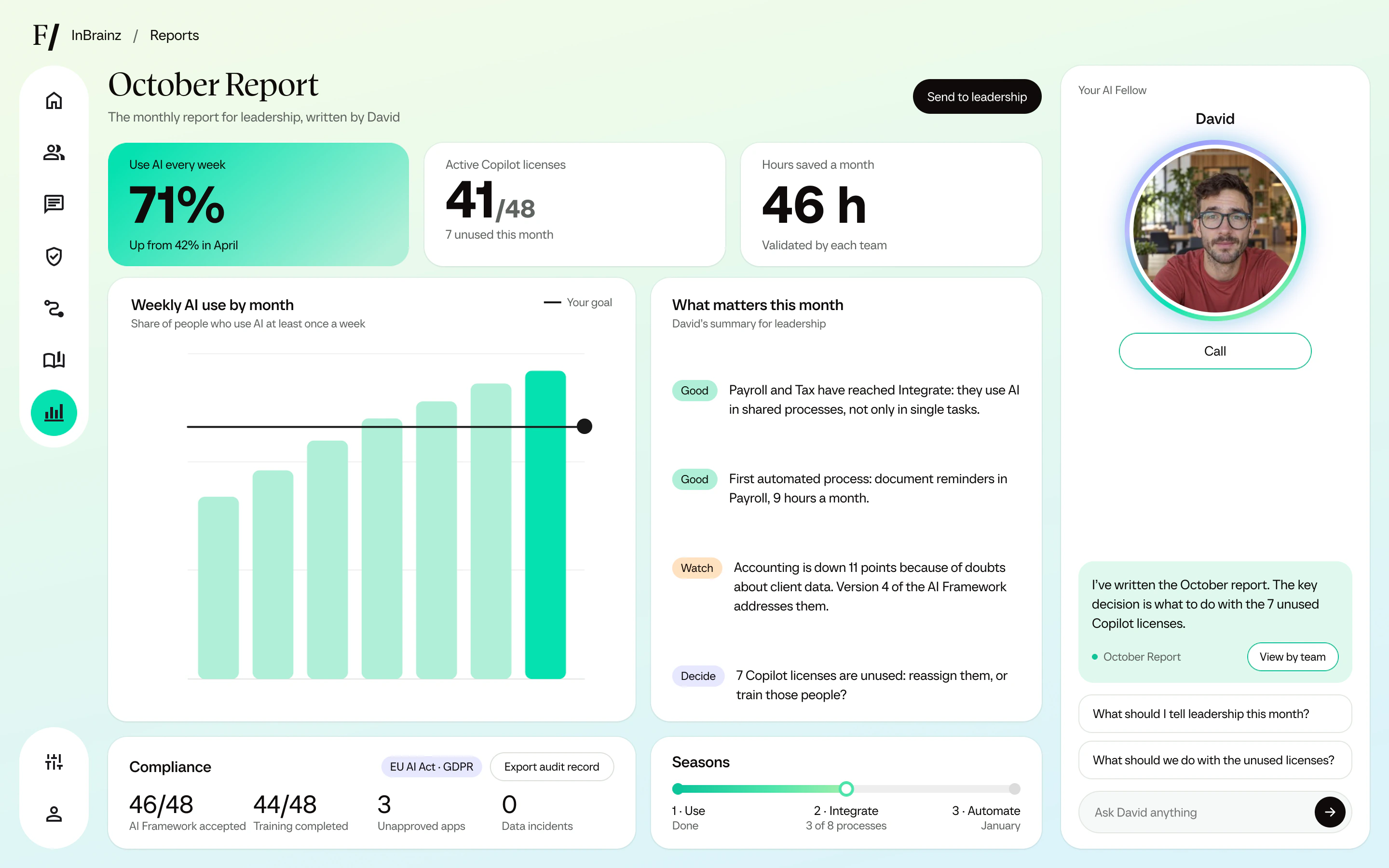
    Your AI Fellow writes what changed against your goal and what needs a decision, ready to send.

    1. Weekly AI use and hours saved, from sessions and each team’s validation, and the licenses you enter.
    2. Each month against the goal from the Initial Assessment.
    3. What the Fellow thinks needs a decision.
    The October Report for leadership: weekly AI use, active Copilot licenses, hours saved, the monthly trend against the goal, what matters this month, and the compliance record with an audit record to export.
  7. Compliance

    Keep a record you can show.

    See who took the AI Framework session, with which version, and who finished training, along with the unapproved apps and data incidents people report in their sessions. Export the record for an audit. Compliance decisions stay with you and your legal advisors.

    1. Who accepted the current AI Framework, and who finished training.
    2. The regulations your rules are mapped to.
    3. An audit record of every session and AI Framework version, ready to export.
    The October Report for leadership: weekly AI use, active Copilot licenses, hours saved, the monthly trend against the goal, what matters this month, and the compliance record with an audit record to export.
  8. Your AI Fellow

    Ask your AI Fellow what to do next.

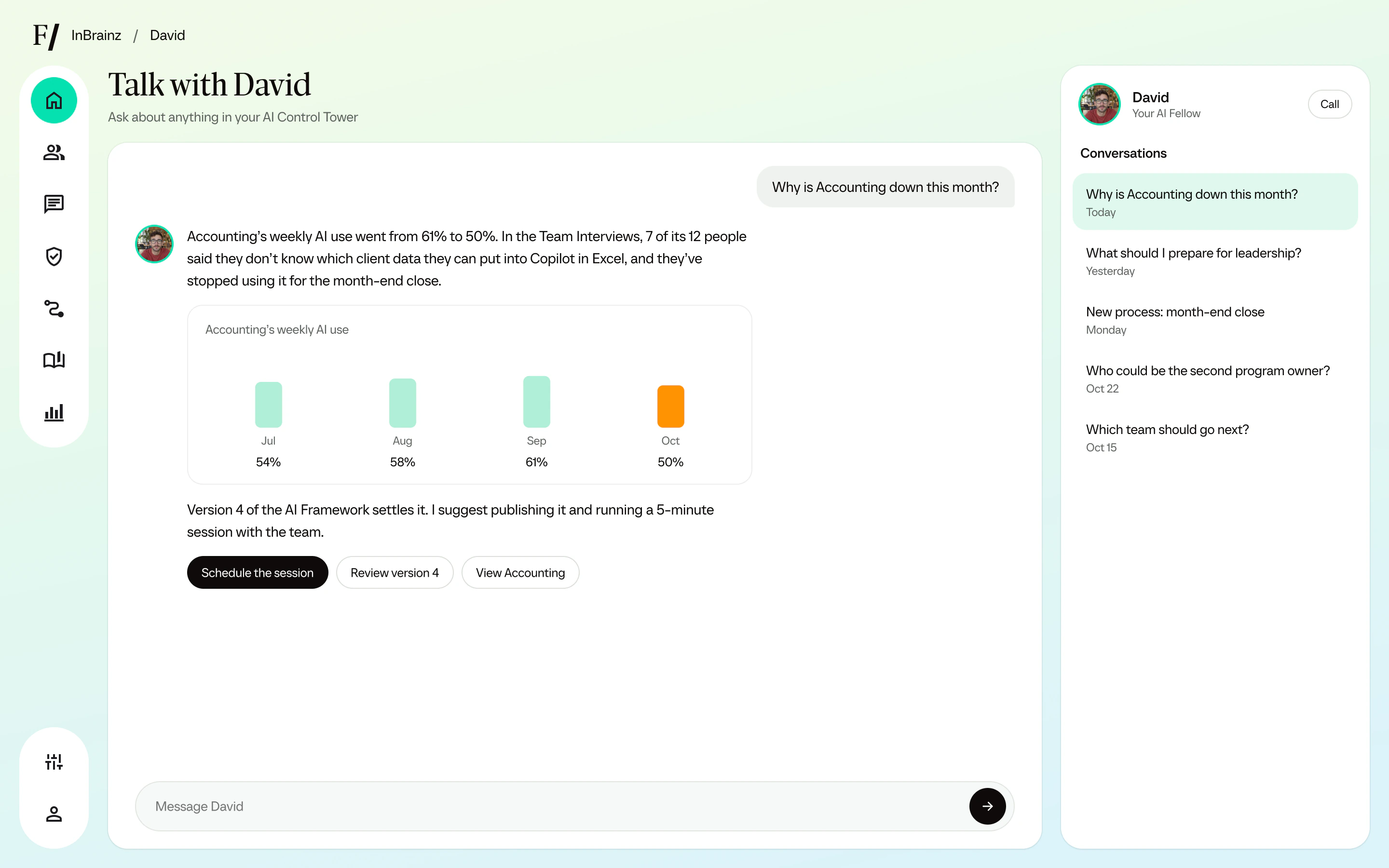
    Your AI Fellow follows every team with you. It points out what needs a decision, and you can ask it anything, by voice or text.

    1. What it noticed, with the numbers behind it.
    2. The decision it suggests, ready to act on.
    A chat with the AI Fellow in the AI Control Tower: asked why one team’s AI use fell, it answers with the monthly figures and suggests publishing the next version of the AI Framework.
  9. AI Studio

    Let your teams build their own AI Fellows.

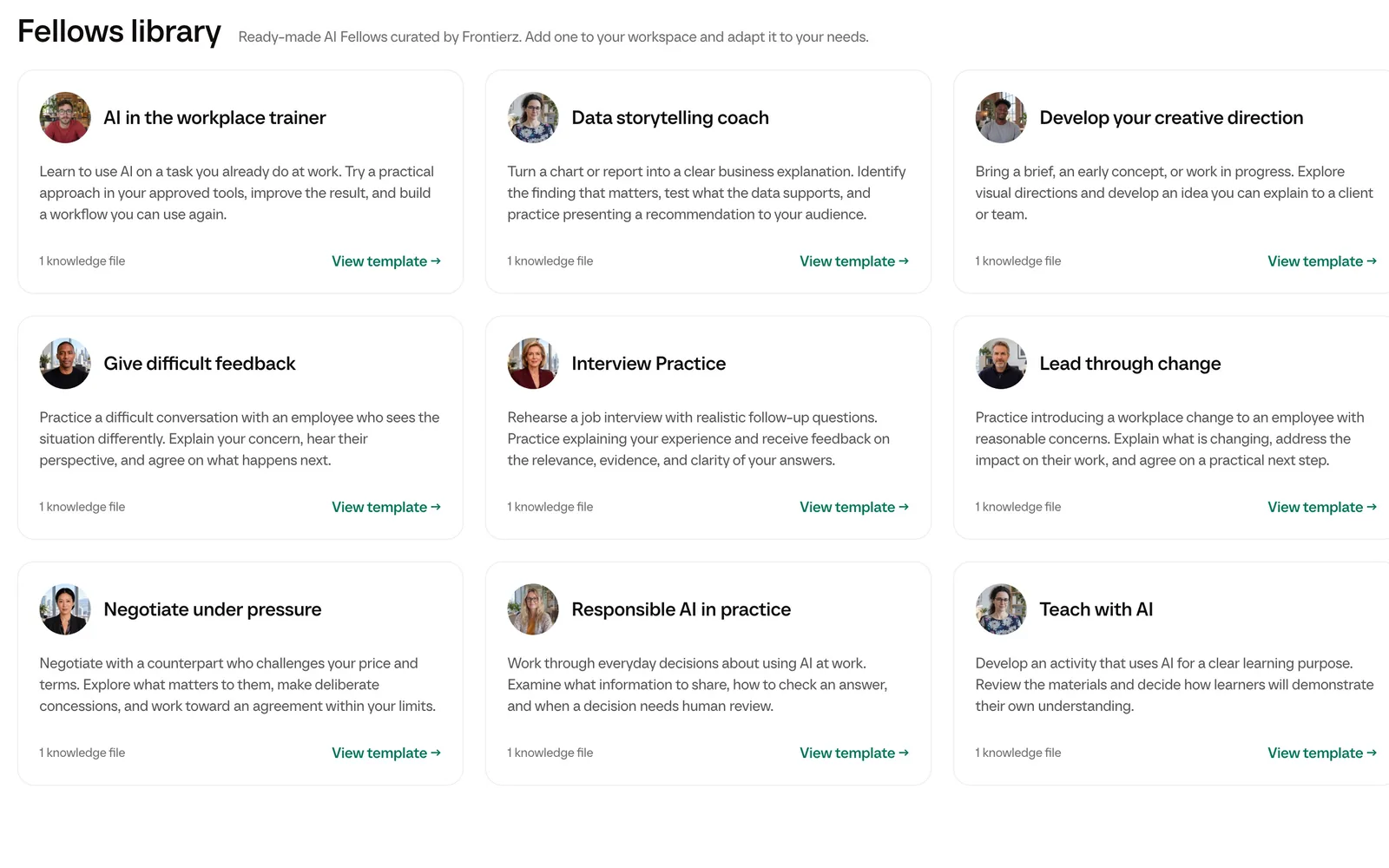
    In AI Studio, teams can start from a ready-made Fellow, add their own documents and share it with colleagues, without writing code.

    1. Ready-made AI Fellows, curated by Frontierz, to start from.
    2. The team’s own documents, so the Fellow knows its work.
    The Fellows library in AI Studio: ready-made AI Fellows curated by Frontierz, such as an AI in the workplace trainer, a data storytelling coach and Responsible AI in practice, each with a knowledge file.

Meet your AI Fellows

AI Fellows stay beside your people at work. Each person can call one in 25 languages. It’s patient, remembers the main points of past calls and works from your company’s content within strict guardrails.

Anita AI Fellow

Most companies use AI.
Few see it in their results yet.

Partners in learning

Selected collaborations from Founderz, the team behind Frontierz.

Fitch Learning and Founderz are combining practitioner-led financial education with personalized AI learning, Learning Paths and simulations.

Read more

Questions before
you start.

What team leaders and business owners ask us most.

Who is the AI Adoption Platform for?

The AI Adoption Platform is for team leaders and business owners who want a live space where their whole team adopts AI safely. Small and medium-sized companies use it, and so do teams inside large corporations. It works for teams of all sizes; a large company starts with one business unit and rolls out team by team. It is an AI adoption program in three steps, with 1:1 AI training built from each team’s real tasks.

How much of my team’s time does it take?

A few hours per person in total, spread over short sessions: a Team Interview, an AI Framework session and 4 to 6 training sessions. You and your decision makers start with a short Initial Assessment. AI Fellows run every session, so no one on your team has to organize the training.

Do we need new AI tools?

No. Frontierz helps your team use the AI tools you already pay for, whether that is Microsoft 365 Copilot, ChatGPT, Gemini, Claude or an internal tool, and does not replace them. If you have Microsoft 365 Copilot, we start there.

How will I know it’s working?

We look at figures you can check. Weekly AI use by team comes from what people tell their AI Fellow in sessions, the platform records each session completed, and each team validates the hours it saves on each process. We also record what didn’t work, and we don’t promise a result before we see your data.

What happens after the three steps?

You get access to your AI Control Tower, with the live Use Case Map. Owners and Admins see every team there, and a Manager sees the teams assigned to them. The work continues in three seasons: everyone uses AI on their own tasks, teams turn what works into shared processes, and the processes that prove themselves are automated. New Team Interviews every quarter show what changed. Seasons and automations are new and still in development.

Is our company’s data safe?

Frontierz separates each company’s data and checks access on the server. Security at Frontierz explains encryption, access controls and incident response. Our Responsible AI Manifesto covers human oversight and privacy in AI sessions.

Does the AI Framework make us compliant?

Not on its own. We map your rules to the regulations you choose, such as the EU AI Act and GDPR, and keep a record of who took each session, which you can export for an audit. Compliance decisions stay with you and your legal advisors.

What can we use today?

You can use the three steps, the AI Control Tower, AI Fellows, Learning Paths, AI Simulations and reports today. Only seasons and automations are still in development.

How do we get started?

You and your decision makers start with an Initial Assessment, and then we prepare your workspace. You invite your team from the platform: each person gets an email, signs in with the link in it or with your company’s single sign-on (Microsoft Entra, Google or SAML), and starts with their Team Interview. SCIM provisioning can be enabled for your company. Request an Initial Assessment.

Rather talk to a real person?

Tell us about your team and the AI you use. We’ll show you how Frontierz would fit.

Technology moves fast.
Education should too.

Frontierz is built by Founderz, a Microsoft Worldwide Training Partner on AI.

700,000+ professionals trained in AI by Founderz

Discover Founderz

Live AI Fellow session

AI Fellow

Open in a new tab

Built by the team behind Founderz

Selected collaborations

  • Microsoft
  • HSBC UK
  • Babson College
  • Fitch Learning

Talk to Frontierz

Tell us about your team and what you want to do with AI. We’ll get in touch to find a time to talk.